Drive Settings Details
Understanding Wine Drives
Section titled “Understanding Wine Drives”All Windows programs think of paths as Windows paths.
For example, they expect paths such as C:myapp/some.exe.
But macOS paths are not written that way; they use Unix/Linux-style paths such as /Users/myID/some.app.
Even if the user does not need to care, Wine must provide paths that Windows programs can understand.
C: Drive
Section titled “C: Drive”Wine maps this path to a macOS path for Windows apps.
For example, it maps something like /User/MyID/WinePrefix -> C:/.
Here, C: means the Windows C drive. You can think of the C drive as an alias for the macOS path assigned by Wine. However, the C drive only exposes the contents inside a specific mapped path.
C:/Program Files/C:/Users/...It cannot access other macOS folders or programs outside that mapped path.
In other words, it can only use what is inside the mapped C:/.
Z: Drive
Section titled “Z: Drive”Z: is an alias for the macOS root path, /.
If the C drive is for paths inside the mapped prefix, the Z drive can point to paths outside that macOS system location.
Therefore, Z: is useful for running Windows apps located outside the prefix or managing apps shared across prefixes. However, because Z: points to the top-level root path, manually specifying full external paths can be quite cumbersome.
G: Drive
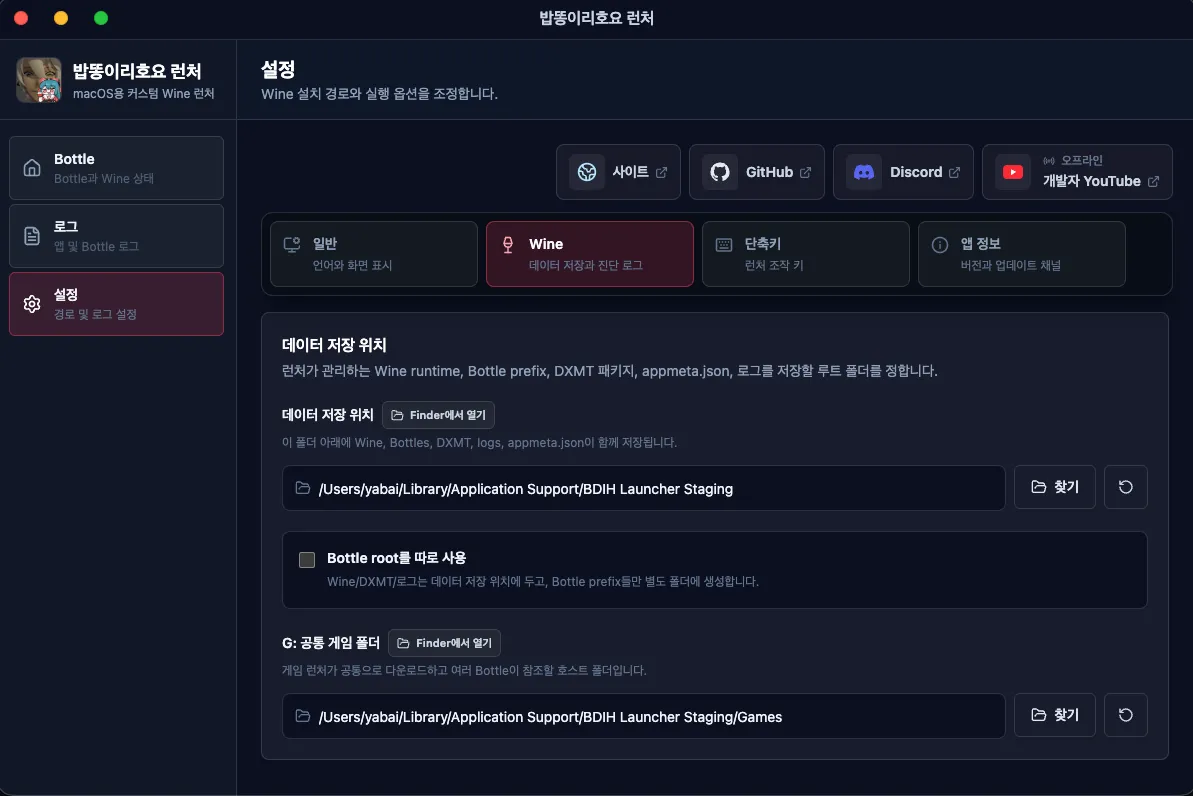
Section titled “G: Drive”For that reason, BDIH Launcher additionally provides a path called G Drive (G:) that all Bottles can share and that lets users choose the path themselves. It lets users use an arbitrary external path without repeatedly specifying the full path.
G Drive (G:) can be found in the Wine section of settings. Through this G: Drive, multiple Bottles can easily store and share games.